Varlens - DSLR in Phone8.2
Publisher Description

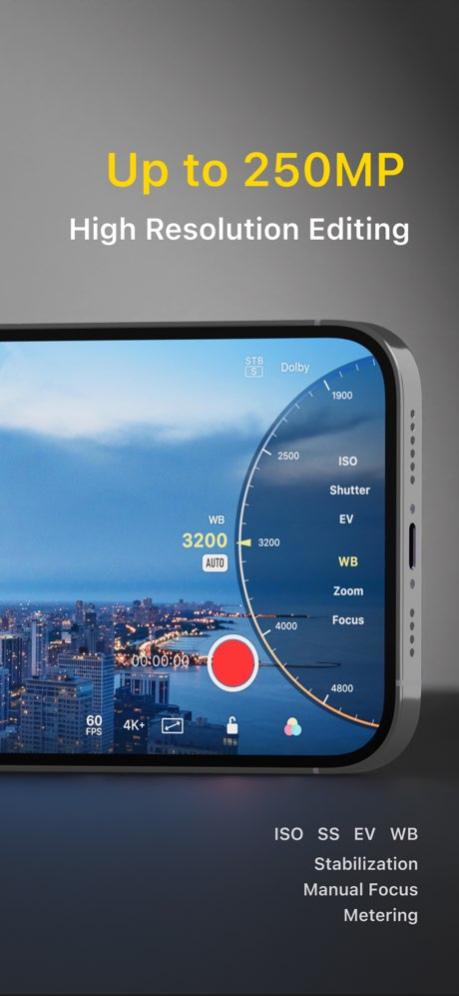
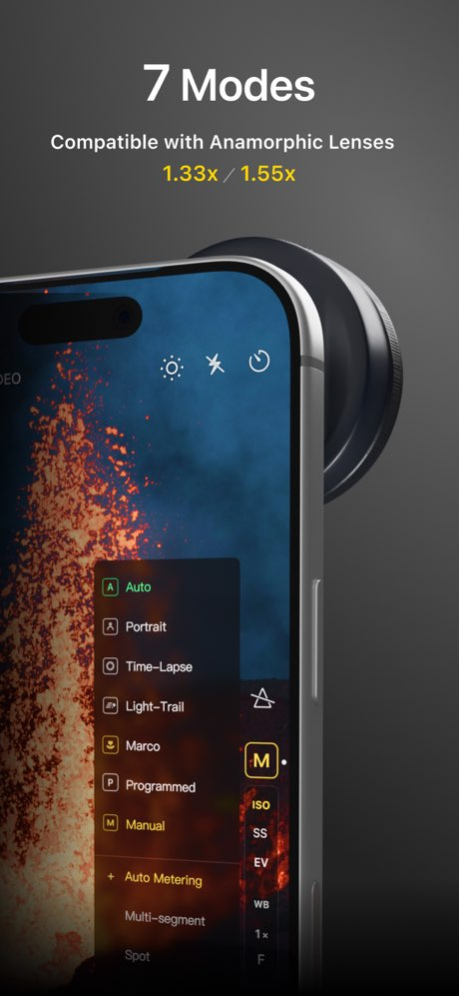

Varlens is an ultimate pro camera app, can turn your phone as a DSLR camera. With more than 100 functions, and easy to use.
Recommended as "Fresh App"
Selected as "The Best Camera Apps" in United State AppStore
# Classic Filters, High-Fidelity Reproduction, Analog Presets, Easy to Self-made
- HiFi Filters: Built-in HS Nature HIFi filter, can import LUT files from Fujifilm and Sony websites to generate high fidelity DSLR style filters
- Every month launches a new high-quality filter;
- Dozens of carefully designed classic Kodak and Fuji films, Rico, Leica classic styles, Master filters
- Free import unlimited .cube or .3dl 3D LUTs as filters
- Tune filter's style such as intensity, exposure, grain and frame
- Customizable presets. Three official examples are provided: AI Beauty, GND Filter (Linear Gradient and Zoned), and Sky Mask
- Classic CCD and Polaroid analog presets, dozens of parameters can be fine-tuned
# DSLR-level photography
- 7 MODES: Auto, Portrait, Time-lapse, Light Trail, Macro, Program, Manual
- 4K Live Photo: Ultra HD Live, with filters render realtime
- EXCLUSIVELY Portrait Photography Algorithm, Simulate optical bokeh of super large aperture and depth of field blur, comparable to the effect of telephoto lens of DSLR camera
- AI DE-SHARPEN, remove over-sharpening of iPhone camera
- 50x digital zoom, f/1.1 digital aperture, 30 seconds long exposure, 60 seconds long time-lapse interval
- Manual control ISO, Shutter, EV, White Balance, Focus, and multiple Metering modes
- Image formats: HEIC, JPEG, Live Photo, TIFF, RAW / ProRAW, with 12MP / 24MP / 48MP options
- Grid, Level, Histogram, Zebra Stripe, Focus Peaking
- Magnifying Glass, Mirror Front Camera
- Anamorphic Lens: 1.33x and 1.55x
- Bluetooth Shutter
# Very Professional Photo Editing
- AI Features: Aperture, Whitening, Spot Removal, and Face Slimming. Perfectly crafted, maintaining original image quality, and manual adjustments.
- Masks: Subject, Sky, Linear Gradient, Radial Gradient
- Presets: Create presets with AI, masks, and various editing parameters. Presets can be used for both editing and shooting.
- Exclusively HSL+ tool, pick up and blend color locally, better than Lightroom and VSCO
- "Shoot then focus": Portrait mode photos can be readjusted focus and aperture
- Aperture, Exposure, Brightness, Contrast, Highlights, Shadows, Saturation, Tint, De-noise, Grain, Vignette, Curves, Split Tone and more
- High-definition, high-quality processing of the whole process, from shooting, saving, to photo editing, NON-Destructive original image
- Artistic Photo Frame, with displaying camera manufacturer, model name and other EXIF shooting parameters
- Self-made Logo
# Cinematic Video
- Open Gate: Recording video at full resolution of CMOS sensor
- 3-level stabilization, easy to shoot cinematic video
- REAL-TIME color grading filters, capture slow motion video, up to 240 fps high speed
- Pause and continue recording video, one-time production, no need for video editing
- Color: HDR, HDR10, Dolby Vision, Apple Log, Log2
- Codec: HEVC, H.264, ProRes, ProRes RAW
- Stereo recording, two-channel pickup display
# Extreme Experience
- Lots of widgets: Golden Hour, Photography Mode, Favorite Filters, Photo Editing can be accessed quickly from home screen
- Optimize GPU/CPU/NPU performance deeply for saving power
- Left-hand interface
- More preferences in advanced
---- Notice about Auto-Renewal Subscription --
Varlens Pro - Monthly: $5.99 / mon
Varlens Pro - Yeally: $26.99 / 12 mons
The automatic renewal of your Pro membership subscription will be automatically deducted from your iTunes account within 24 hours before the membership expires;
You can go to the account settings to manage the subscription and cancel the subscription after purchase. The specific path is: "Settings" -> Apple ID -> Subscription
Terms of Service: https://varlens.com/service/term
Privacy Policy: https://varlens.com/en-US/service/privacy-policy
Version History The new version introduces a new film simulation filter: CN200. Designed to emulate Rollei CN200 film, it faithfully reproduces the film's distinctive tonal characteristics.
Additionally, the update optimizes the processing pipeline and performance of the HiFi filter, delivering exceptional image quality for both RAW and ProRAW formats. 8.2 Sep 17 New Master Filter "Odyssey": Recreating the Visual Tension of Epic Films
The new version supports HiFi filter photography on non-Pro models. In addition to the built-in HS Nature HiFi filter, which highly replicates the Hasselblad style, you can also download LUT files from the Fujifilm and Sony websites and import them into Varens to automatically generate HiFi filters for photography, highly replicating the Fujifilm and Sony styles.
The new version has also been adapted and optimized for iPhone Air, and some issues affecting the user experience have been improved and resolved. 8.1 Aug 14 The new version resolves and optimizes the following issues:
- Added a button to view the original image in post-editing, located in the lower left corner of the image.
- Sometimes the 48MP result from the iPhone Air appears as 12MP.
- Sometimes the rainbow effect still appears even after the preset rainbow effect is turned off.
- Sometimes a green screen appears during Live Photo post-editing.
- Sometimes photos taken with the HiFi filter show large areas of pink.
- When Varlens is not granted camera permissions, reopening Varlens will provide setup guidance. 8.0.1 Aug 7 The new version introduces a new HiFi filter: HS-Nature, aiming to perfectly reproduce the natural color effect of Hasselblad cameras on mobile phones.
Unlike LUT filters, HiFi filters employ a completely new image processing pipeline, processing directly on ProRAW and RAW formats. They utilize the most professional image processing technology to achieve optimal image quality. Due to the complexity of the processing method, real-time preview is not available; the effect can only be viewed after shooting.
HiFi filters represent a new attempt by the Varlens team to pursue higher mobile image quality, and high-quality HiFi filters will continue to be released.
Additionally, it already supports importing official LUT files from Fujifilm and Sony to automatically generate HiFi filters. 8.0 Jul 10 The new version introduces the HS Nature filter, bringing Hasselblad Natural Color to mobile photography. 7.5.4 Jun 29 - New Master Filter: Hamada Vision - delicately recreates Hideaki Hamada's signature bright light, soft shadows, and airy aesthetic
- Fixed an issue where PNG images could not be recognized as watermarks
- Fixed an issue when switching resolution and frame rate with anamorphic lenses
- Fixed an issue where time-lapse could not save videos and photos 7.5.3 May 26 - HiFi filters now support Sony S-Log3 and ARRI LogC3 LUTs downloaded from the official Sony and ARRI websites
- Optimized memory usage for 48MP shooting with HiFi filters
- Added a new version feature introduction page
- Fixed an issue where Live Photo / video edits could appear zoomed in
- Fixed an issue where the mask entry was not shown during post-editing in landscape on iPad.
- Optimized lens retention logic in Portrait mode 7.5.2 May 20 - Improved the Live Photo editing experience. Re-editing is now supported.
- Improved HiFi / 48MP shooting stability, reducing freezes, crashes, and cases where no photo is produced.
- Fixed a possible overexposure issue when shooting HiFi photos at night.
- Fixed an issue where exposure parameters could be lost for some filters.
- Unified watermark settings across Camera, Settings, and post-editing. 7.5.1 May 10 The new version introduces a feature that perfectly renders official Fujifilm LUTs, which we call "HiFi Filters."
Simply import official Fujifilm LUT files (including FLog, FLog2, and FLogC) into Varlens, and a HiFi filter will be automatically generated.
Using it will enable the same image processing pipeline as professional SLR cameras and camcorders, providing a fully Hi-End experience. With Varlens, you can achieve almost the same results as Fujifilm cameras, experiencing the true Fujifilm style.
LUTs (S-Log, LogC) from renowned manufacturers such as Sony and ARRI are also perfectly supported.
This feature is currently free; simply find the official LUT from the manufacturer and import it into Varlens to use it.
The new version also resolves the issue introduced in version 7.4.14 that caused video loss. We sincerely apologize for this oversight. 7.5 Apr 30 Introducing the new filter: Nolan Vision. Faithfully recreates the cinematic look of Kodak Vision 2303, favored by Nolan. 7.4.14 Apr 23 The new version resolves issues with photographer watermarks, crashes when editing very large images, and optimizes gain noise effect in film filters. 7.4.13 Apr 8 The new version fixed the following issues:
- On iOS 26.4, with Zoom 2.0x or larger, sometimes clicking the thumbnail in the bottom left corner immediately after taking a photo would fail to save the image.
- Fixed GPS info saving issue.
- Fixed the issue of occasional crashes when using the beauty mode during post-editing. 7.4.12 Apr 3 The new version introduces a new film filter: ACR100, recreating classic Fujifilm black and white film.
In addition, the new version improves the following:
- Optimized the portrait mode photography experience; iOS 26.3 allows switching between 1.0/4.0 lenses.
- Improved image quality at 2x zoom.
- Resolved some crash issues. 7.4.11 Mar 25 - Fixed some crash issues
- Added the ability to automatically detect external devices
- Optimized the scroll wheel interaction experience 7.4.10 Mar 14 - Fixed crash issues
- Fixed some known issues 7.4.9 Mar 6 - Added new filter: Ricoh Green (GR-Green)
- Fixed some known issues 7.4.8 Mar 1 - Optimized stability when continuously shooting 48MP photos
- Significantly reduced memory consumption when shooting with watermarks
- Fixed an issue that caused viewfinder stuttering when taking photos while recording video
- Improved stability of batch importing LUT files
- Fixed occasional frame drops during H.264 4K 60FPS recording
- Resolved abnormal startup of lock screen widgets 7.4.7 Feb 12 The new version supports video playback progress; during video playback, you can drag the progress bar to control playback, and click to pause and resume playback.
It also resolves the following issues:
- When shooting in RAW/ProRAW format (introduced in the previous version), photos sometimes turn purple.
- Deleting photos when using an external SSD/SD card causes a crash.
- Optimized memory consumption for post-editing images, reducing it by 30%. 7.4.6 Jan 31 The new version adds a new Master filter, Classic M, paying homage to the legendary Leica M series rangefinder cameras.
It also supports displaying HDR photos in the Varlens album, allowing you to see the high dynamic range image effects. 7.4.5 Jan 26 Optimized the ProRes RAW pipeline and resolves the ProRes RAW 1.85:1 120 fps recording issue. 7.4.4 Jan 7 The new version resolves the crash issue introduced in version 7.4.2, optimizes the batch-process images and improves display clarity of ProRAW images. 7.4.3 12/31/2025 Introduces a new master filter, “Silver Halide”, inspired by British photographer Greg William, a long-time collaborator with Leica.
Additionally, several user experience improvements have been made:
- A completely redesigned filter and preset list, further highlighting the quality of Varlens' meticulously designed and tuned filters and presets.
- A pre-made tutorial video for "Cinematic Mode" is included, available for free to iOS 26 users.
- Improved clarity in RAW format image previews.
- Adapted to focal length of the iPhone Air.
- Resolved the orientation issue when shooting Live Photos with the front camera.
- Fixed crashes in certain scenarios. 7.4.2 12/27/2025 The new version introduces the "Cinematic" mode:
- Tap to switch focus target and automatically track it for focus (solid line)
- Automatically switch focus based on foreground objects (dashed line).
- Long press to lock focus on a specific area.
- Adjustable aperture, supporting f/2.0 to f/16.0 (currently adjustable only before recording video, not during recording).
- Pause and resume recording during Cinematic video recording.
- Take photos while recording Cinematic video.
- Movie mode currently only supports SDR, HDR, and HEVC. Format
- Compatible with all iPhone models running iOS 26
This new version also resolves the issue of app freeze the image when switching back from other apps 7.4.1 12/22/2025 The new version introduces the "Cinematic" mode:
- Tap to switch focus target and automatically track it for focus (solid line)
- Automatically switch focus based on foreground objects (dashed line).
- Long press to lock focus on a specific area.
- Adjustable aperture, supporting f/2.0 to f/16.0 (currently adjustable only before recording video, not during recording).
- Pause and resume recording during Cinematic video recording.
- Take photos while recording Cinematic video.
- Movie mode currently only supports SDR, HDR, and HEVC. Format
- Compatible with all iPhone models running iOS 26
This new version also resolves the issue of app crashes and inability to open on iOS 26.2. 7.4 12/17/2025 The new version introduces several new features:
- ProRes RAW video recording, with two resolutions: 4:3 and 1.85 aspect ratio. Available for iPhone 17 Pro/Pro Max. Recording in ProRes RAW format requires an external storage device, such as an SSD or SD card.
- Added Hasselblad XPan 65:24 aspect ratio to Photo mode, and added 1.66, 1.85, and 2.39 aspect ratios to Video mode.
- Resolved the issue of the new video feature always pops up.
- Resolved the issue of some models being unable to successfully capture 4K Live photos. 7.3 12/05/2025
About Varlens - DSLR in Phone
The company that develops Varlens - DSLR in Phone is Aura Marker Studio Co., Ltd.. The latest version released by its developer is 8.2. This app was rated by 3 users of our site and has an average rating of 4.5.
To install Varlens - DSLR in Phone on your iOS device, just click the green Continue To App button above to start the installation process. The app is listed on our website since 2026-10-14 and was downloaded 10,500 times. We have already checked if the download link is safe, however for your own protection we recommend that you scan the downloaded app with your antivirus. Your antivirus may detect the Varlens - DSLR in Phone as malware if the download link is broken.
How to install Varlens - DSLR in Phone on your iOS device:
- Click on the Continue To App button on our website. This will redirect you to the App Store.
- Once the Varlens - DSLR in Phone is shown in the iTunes listing of your iOS device, you can start its download and installation. Tap on the GET button to the right of the app to start downloading it.
- If you are not logged-in the iOS appstore app, you'll be prompted for your your Apple ID and/or password.
- After Varlens - DSLR in Phone is downloaded, you'll see an INSTALL button to the right. Tap on it to start the actual installation of the iOS app.
- Once installation is finished you can tap on the OPEN button to start it. Its icon will also be added to your device home screen.
Program Details
System requirements
Download information
Pricing
Version History
version 8.2
posted on 2026-10-14
Version History The new version introduces a new film simulation filter: CN200. Designed to emulate Rollei CN200 film, it faithfully reproduces the film's distinctive tonal characteristics.
Additionally, the update optimizes the processing pipeline and performance of the HiFi filter, delivering exceptional image quality for both RAW and ProRAW formats. 8.2 Sep 17 New Master Filter "Odyssey": Recreating the Visual Tension of Epic Films
The new version supports HiFi filter photography on non-Pro models. In addition to the built-in HS Nature HiFi filter, which highly replicates the Hasselblad style, you can also download LUT files from the Fujifilm and Sony websites and import them into Varens to automatically generate HiFi filters for photography, highly replicating the Fujifilm and Sony styles.
The new version has also been adapted and optimized for iPhone Air, and some issues affecting the user experience have been improved and resolved. 8.1 Aug 14 The new version resolves and optimizes the following issues:
- Added a button to view the original image in post-editing, located in the lower left corner of the image.
- Sometimes the 48MP result from the iPhone Air appears as 12MP.
- Sometimes the rainbow effect still appears even after the preset rainbow effect is turned off.
- Sometimes a green screen appears during Live Photo post-editing.
- Sometimes photos taken with the HiFi filter show large areas of pink.
- When Varlens is not granted camera permissions, reopening Varlens will provide setup guidance. 8.0.1 Aug 7 The new version introduces a new HiFi filter: HS-Nature, aiming to perfectly reproduce the natural color effect of Hasselblad cameras on mobile phones.
Unlike LUT filters, HiFi filters employ a completely new image processing pipeline, processing directly on ProRAW and RAW formats. They utilize the most professional image processing technology to achieve optimal image quality. Due to the complexity of the processing method, real-time preview is not available; the effect can only be viewed after shooting.
HiFi filters represent a new attempt by the Varlens team to pursue higher mobile image quality, and high-quality HiFi filters will continue to be released.
Additionally, it already supports importing official LUT files from Fujifilm and Sony to automatically generate HiFi filters. 8.0 Jul 10 The new version introduces the HS Nature filter, bringing Hasselblad Natural Color to mobile photography. 7.5.4 Jun 29 - New Master Filter: Hamada Vision - delicately recreates Hideaki Hamada's signature bright light, soft shadows, and airy aesthetic
- Fixed an issue where PNG images could not be recognized as watermarks
- Fixed an issue when switching resolution and frame rate with anamorphic lenses
- Fixed an issue where time-lapse could not save videos and photos 7.5.3 May 26 - HiFi filters now support Sony S-Log3 and ARRI LogC3 LUTs downloaded from the official Sony and ARRI websites
- Optimized memory usage for 48MP shooting with HiFi filters
- Added a new version feature introduction page
- Fixed an issue where Live Photo / video edits could appear zoomed in
- Fixed an issue where the mask entry was not shown during post-editing in landscape on iPad.
- Optimized lens retention logic in Portrait mode 7.5.2 May 20 - Improved the Live Photo editing experience. Re-editing is now supported.
- Improved HiFi / 48MP shooting stability, reducing freezes, crashes, and cases where no photo is produced.
- Fixed a possible overexposure issue when shooting HiFi photos at night.
- Fixed an issue where exposure parameters could be lost for some filters.
- Unified watermark settings across Camera, Settings, and post-editing. 7.5.1 May 10 The new version introduces a feature that perfectly renders official Fujifilm LUTs, which we call "HiFi Filters."
Simply import official Fujifilm LUT files (including FLog, FLog2, and FLogC) into Varlens, and a HiFi filter will be automatically generated.
Using it will enable the same image processing pipeline as professional SLR cameras and camcorders, providing a fully Hi-End experience. With Varlens, you can achieve almost the same results as Fujifilm cameras, experiencing the true Fujifilm style.
LUTs (S-Log, LogC) from renowned manufacturers such as Sony and ARRI are also perfectly supported.
This feature is currently free; simply find the official LUT from the manufacturer and import it into Varlens to use it.
The new version also resolves the issue introduced in version 7.4.14 that caused video loss. We sincerely apologize for this oversight. 7.5 Apr 30 Introducing the new filter: Nolan Vision. Faithfully recreates the cinematic look of Kodak Vision 2303, favored by Nolan. 7.4.14 Apr 23 The new version resolves issues with photographer watermarks, crashes when editing very large images, and optimizes gain noise effect in film filters. 7.4.13 Apr 8 The new version fixed the following issues:
- On iOS 26.4, with Zoom 2.0x or larger, sometimes clicking the thumbnail in the bottom left corner immediately after taking a photo would fail to save the image.
- Fixed GPS info saving issue.
- Fixed the issue of occasional crashes when using the beauty mode during post-editing. 7.4.12 Apr 3 The new version introduces a new film filter: ACR100, recreating classic Fujifilm black and white film.
In addition, the new version improves the following:
- Optimized the portrait mode photography experience; iOS 26.3 allows switching between 1.0/4.0 lenses.
- Improved image quality at 2x zoom.
- Resolved some crash issues. 7.4.11 Mar 25 - Fixed some crash issues
- Added the ability to automatically detect external devices
- Optimized the scroll wheel interaction experience 7.4.10 Mar 14 - Fixed crash issues
- Fixed some known issues 7.4.9 Mar 6 - Added new filter: Ricoh Green (GR-Green)
- Fixed some known issues 7.4.8 Mar 1 - Optimized stability when continuously shooting 48MP photos
- Significantly reduced memory consumption when shooting with watermarks
- Fixed an issue that caused viewfinder stuttering when taking photos while recording video
- Improved stability of batch importing LUT files
- Fixed occasional frame drops during H.264 4K 60FPS recording
- Resolved abnormal startup of lock screen widgets 7.4.7 Feb 12 The new version supports video playback progress; during video playback, you can drag the progress bar to control playback, and click to pause and resume playback.
It also resolves the following issues:
- When shooting in RAW/ProRAW format (introduced in the previous version), photos sometimes turn purple.
- Deleting photos when using an external SSD/SD card causes a crash.
- Optimized memory consumption for post-editing images, reducing it by 30%. 7.4.6 Jan 31 The new version adds a new Master filter, Classic M, paying homage to the legendary Leica M series rangefinder cameras.
It also supports displaying HDR photos in the Varlens album, allowing you to see the high dynamic range image effects. 7.4.5 Jan 26 Optimized the ProRes RAW pipeline and resolves the ProRes RAW 1.85:1 120 fps recording issue. 7.4.4 Jan 7 The new version resolves the crash issue introduced in version 7.4.2, optimizes the batch-process images and improves display clarity of ProRAW images. 7.4.3 12/31/2025 Introduces a new master filter, “Silver Halide”, inspired by British photographer Greg William, a long-time collaborator with Leica.
Additionally, several user experience improvements have been made:
- A completely redesigned filter and preset list, further highlighting the quality of Varlens' meticulously designed and tuned filters and presets.
- A pre-made tutorial video for "Cinematic Mode" is included, available for free to iOS 26 users.
- Improved clarity in RAW format image previews.
- Adapted to focal length of the iPhone Air.
- Resolved the orientation issue when shooting Live Photos with the front camera.
- Fixed crashes in certain scenarios. 7.4.2 12/27/2025 The new version introduces the "Cinematic" mode:
- Tap to switch focus target and automatically track it for focus (solid line)
- Automatically switch focus based on foreground objects (dashed line).
- Long press to lock focus on a specific area.
- Adjustable aperture, supporting f/2.0 to f/16.0 (currently adjustable only before recording video, not during recording).
- Pause and resume recording during Cinematic video recording.
- Take photos while recording Cinematic video.
- Movie mode currently only supports SDR, HDR, and HEVC. Format
- Compatible with all iPhone models running iOS 26
This new version also resolves the issue of app freeze the image when switching back from other apps 7.4.1 12/22/2025 The new version introduces the "Cinematic" mode:
- Tap to switch focus target and automatically track it for focus (solid line)
- Automatically switch focus based on foreground objects (dashed line).
- Long press to lock focus on a specific area.
- Adjustable aperture, supporting f/2.0 to f/16.0 (currently adjustable only before recording video, not during recording).
- Pause and resume recording during Cinematic video recording.
- Take photos while recording Cinematic video.
- Movie mode currently only supports SDR, HDR, and HEVC. Format
- Compatible with all iPhone models running iOS 26
This new version also resolves the issue of app crashes and inability to open on iOS 26.2. 7.4 12/17/2025 The new version introduces several new features:
- ProRes RAW video recording, with two resolutions: 4:3 and 1.85 aspect ratio. Available for iPhone 17 Pro/Pro Max. Recording in ProRes RAW format requires an external storage device, such as an SSD or SD card.
- Added Hasselblad XPan 65:24 aspect ratio to Photo mode, and added 1.66, 1.85, and 2.39 aspect ratios to Video mode.
- Resolved the issue of the new video feature always pops up.
- Resolved the issue of some models being unable to successfully capture 4K Live photos. 7.3 12/05/2025
version 8.2
posted on 2026-09-19
Version History The new version introduces a new film simulation filter: CN200. Designed to emulate Rollei CN200 film, it faithfully reproduces the film's distinctive tonal characteristics.
Additionally, the update optimizes the processing pipeline and performance of the HiFi filter, delivering exceptional image quality for both RAW and ProRAW formats. 8.2 1d ago New Master Filter "Odyssey": Recreating the Visual Tension of Epic Films
The new version supports HiFi filter photography on non-Pro models. In addition to the built-in HS Nature HiFi filter, which highly replicates the Hasselblad style, you can also download LUT files from the Fujifilm and Sony websites and import them into Varens to automatically generate HiFi filters for photography, highly replicating the Fujifilm and Sony styles.
The new version has also been adapted and optimized for iPhone Air, and some issues affecting the user experience have been improved and resolved. 8.1 Aug 14 The new version resolves and optimizes the following issues:
- Added a button to view the original image in post-editing, located in the lower left corner of the image.
- Sometimes the 48MP result from the iPhone Air appears as 12MP.
- Sometimes the rainbow effect still appears even after the preset rainbow effect is turned off.
- Sometimes a green screen appears during Live Photo post-editing.
- Sometimes photos taken with the HiFi filter show large areas of pink.
- When Varlens is not granted camera permissions, reopening Varlens will provide setup guidance. 8.0.1 Aug 7 The new version introduces a new HiFi filter: HS-Nature, aiming to perfectly reproduce the natural color effect of Hasselblad cameras on mobile phones.
Unlike LUT filters, HiFi filters employ a completely new image processing pipeline, processing directly on ProRAW and RAW formats. They utilize the most professional image processing technology to achieve optimal image quality. Due to the complexity of the processing method, real-time preview is not available; the effect can only be viewed after shooting.
HiFi filters represent a new attempt by the Varlens team to pursue higher mobile image quality, and high-quality HiFi filters will continue to be released.
Additionally, it already supports importing official LUT files from Fujifilm and Sony to automatically generate HiFi filters. 8.0 Jul 10 The new version introduces the HS Nature filter, bringing Hasselblad Natural Color to mobile photography. 7.5.4 Jun 29 - New Master Filter: Hamada Vision - delicately recreates Hideaki Hamada's signature bright light, soft shadows, and airy aesthetic
- Fixed an issue where PNG images could not be recognized as watermarks
- Fixed an issue when switching resolution and frame rate with anamorphic lenses
- Fixed an issue where time-lapse could not save videos and photos 7.5.3 May 26 - HiFi filters now support Sony S-Log3 and ARRI LogC3 LUTs downloaded from the official Sony and ARRI websites
- Optimized memory usage for 48MP shooting with HiFi filters
- Added a new version feature introduction page
- Fixed an issue where Live Photo / video edits could appear zoomed in
- Fixed an issue where the mask entry was not shown during post-editing in landscape on iPad.
- Optimized lens retention logic in Portrait mode 7.5.2 May 20 - Improved the Live Photo editing experience. Re-editing is now supported.
- Improved HiFi / 48MP shooting stability, reducing freezes, crashes, and cases where no photo is produced.
- Fixed a possible overexposure issue when shooting HiFi photos at night.
- Fixed an issue where exposure parameters could be lost for some filters.
- Unified watermark settings across Camera, Settings, and post-editing. 7.5.1 May 10 The new version introduces a feature that perfectly renders official Fujifilm LUTs, which we call "HiFi Filters."
Simply import official Fujifilm LUT files (including FLog, FLog2, and FLogC) into Varlens, and a HiFi filter will be automatically generated.
Using it will enable the same image processing pipeline as professional SLR cameras and camcorders, providing a fully Hi-End experience. With Varlens, you can achieve almost the same results as Fujifilm cameras, experiencing the true Fujifilm style.
LUTs (S-Log, LogC) from renowned manufacturers such as Sony and ARRI are also perfectly supported.
This feature is currently free; simply find the official LUT from the manufacturer and import it into Varlens to use it.
The new version also resolves the issue introduced in version 7.4.14 that caused video loss. We sincerely apologize for this oversight. 7.5 Apr 30 Introducing the new filter: Nolan Vision. Faithfully recreates the cinematic look of Kodak Vision 2303, favored by Nolan. 7.4.14 Apr 23 The new version resolves issues with photographer watermarks, crashes when editing very large images, and optimizes gain noise effect in film filters. 7.4.13 Apr 8 The new version fixed the following issues:
- On iOS 26.4, with Zoom 2.0x or larger, sometimes clicking the thumbnail in the bottom left corner immediately after taking a photo would fail to save the image.
- Fixed GPS info saving issue.
- Fixed the issue of occasional crashes when using the beauty mode during post-editing. 7.4.12 Apr 3 The new version introduces a new film filter: ACR100, recreating classic Fujifilm black and white film.
In addition, the new version improves the following:
- Optimized the portrait mode photography experience; iOS 26.3 allows switching between 1.0/4.0 lenses.
- Improved image quality at 2x zoom.
- Resolved some crash issues. 7.4.11 Mar 25 - Fixed some crash issues
- Added the ability to automatically detect external devices
- Optimized the scroll wheel interaction experience 7.4.10 Mar 14 - Fixed crash issues
- Fixed some known issues 7.4.9 Mar 6 - Added new filter: Ricoh Green (GR-Green)
- Fixed some known issues 7.4.8 Mar 1 - Optimized stability when continuously shooting 48MP photos
- Significantly reduced memory consumption when shooting with watermarks
- Fixed an issue that caused viewfinder stuttering when taking photos while recording video
- Improved stability of batch importing LUT files
- Fixed occasional frame drops during H.264 4K 60FPS recording
- Resolved abnormal startup of lock screen widgets 7.4.7 Feb 12 The new version supports video playback progress; during video playback, you can drag the progress bar to control playback, and click to pause and resume playback.
It also resolves the following issues:
- When shooting in RAW/ProRAW format (introduced in the previous version), photos sometimes turn purple.
- Deleting photos when using an external SSD/SD card causes a crash.
- Optimized memory consumption for post-editing images, reducing it by 30%. 7.4.6 Jan 31 The new version adds a new Master filter, Classic M, paying homage to the legendary Leica M series rangefinder cameras.
It also supports displaying HDR photos in the Varlens album, allowing you to see the high dynamic range image effects. 7.4.5 Jan 26 Optimized the ProRes RAW pipeline and resolves the ProRes RAW 1.85:1 120 fps recording issue. 7.4.4 Jan 7 The new version resolves the crash issue introduced in version 7.4.2, optimizes the batch-process images and improves display clarity of ProRAW images. 7.4.3 12/31/2025 Introduces a new master filter, “Silver Halide”, inspired by British photographer Greg William, a long-time collaborator with Leica.
Additionally, several user experience improvements have been made:
- A completely redesigned filter and preset list, further highlighting the quality of Varlens' meticulously designed and tuned filters and presets.
- A pre-made tutorial video for "Cinematic Mode" is included, available for free to iOS 26 users.
- Improved clarity in RAW format image previews.
- Adapted to focal length of the iPhone Air.
- Resolved the orientation issue when shooting Live Photos with the front camera.
- Fixed crashes in certain scenarios. 7.4.2 12/27/2025 The new version introduces the "Cinematic" mode:
- Tap to switch focus target and automatically track it for focus (solid line)
- Automatically switch focus based on foreground objects (dashed line).
- Long press to lock focus on a specific area.
- Adjustable aperture, supporting f/2.0 to f/16.0 (currently adjustable only before recording video, not during recording).
- Pause and resume recording during Cinematic video recording.
- Take photos while recording Cinematic video.
- Movie mode currently only supports SDR, HDR, and HEVC. Format
- Compatible with all iPhone models running iOS 26
This new version also resolves the issue of app freeze the image when switching back from other apps 7.4.1 12/22/2025 The new version introduces the "Cinematic" mode:
- Tap to switch focus target and automatically track it for focus (solid line)
- Automatically switch focus based on foreground objects (dashed line).
- Long press to lock focus on a specific area.
- Adjustable aperture, supporting f/2.0 to f/16.0 (currently adjustable only before recording video, not during recording).
- Pause and resume recording during Cinematic video recording.
- Take photos while recording Cinematic video.
- Movie mode currently only supports SDR, HDR, and HEVC. Format
- Compatible with all iPhone models running iOS 26
This new version also resolves the issue of app crashes and inability to open on iOS 26.2. 7.4 12/17/2025 The new version introduces several new features:
- ProRes RAW video recording, with two resolutions: 4:3 and 1.85 aspect ratio. Available for iPhone 17 Pro/Pro Max. Recording in ProRes RAW format requires an external storage device, such as an SSD or SD card.
- Added Hasselblad XPan 65:24 aspect ratio to Photo mode, and added 1.66, 1.85, and 2.39 aspect ratios to Video mode.
- Resolved the issue of the new video feature always pops up.
- Resolved the issue of some models being unable to successfully capture 4K Live photos. 7.3 12/05/2025
version 8.1
posted on 2026-09-12
Version History New Master Filter "Odyssey": Recreating the Visual Tension of Epic Films
The new version supports HiFi filter photography on non-Pro models. In addition to the built-in HS Nature HiFi filter, which highly replicates the Hasselblad style, you can also download LUT files from the Fujifilm and Sony websites and import them into Varens to automatically generate HiFi filters for photography, highly replicating the Fujifilm and Sony styles.
The new version has also been adapted and optimized for iPhone Air, and some issues affecting the user experience have been improved and resolved. 8.1 Aug 14 The new version resolves and optimizes the following issues:
- Added a button to view the original image in post-editing, located in the lower left corner of the image.
- Sometimes the 48MP result from the iPhone Air appears as 12MP.
- Sometimes the rainbow effect still appears even after the preset rainbow effect is turned off.
- Sometimes a green screen appears during Live Photo post-editing.
- Sometimes photos taken with the HiFi filter show large areas of pink.
- When Varlens is not granted camera permissions, reopening Varlens will provide setup guidance. 8.0.1 Aug 7 The new version introduces a new HiFi filter: HS-Nature, aiming to perfectly reproduce the natural color effect of Hasselblad cameras on mobile phones.
Unlike LUT filters, HiFi filters employ a completely new image processing pipeline, processing directly on ProRAW and RAW formats. They utilize the most professional image processing technology to achieve optimal image quality. Due to the complexity of the processing method, real-time preview is not available; the effect can only be viewed after shooting.
HiFi filters represent a new attempt by the Varlens team to pursue higher mobile image quality, and high-quality HiFi filters will continue to be released.
Additionally, it already supports importing official LUT files from Fujifilm and Sony to automatically generate HiFi filters. 8.0 Jul 10 The new version introduces the HS Nature filter, bringing Hasselblad Natural Color to mobile photography. 7.5.4 Jun 29 - New Master Filter: Hamada Vision - delicately recreates Hideaki Hamada's signature bright light, soft shadows, and airy aesthetic
- Fixed an issue where PNG images could not be recognized as watermarks
- Fixed an issue when switching resolution and frame rate with anamorphic lenses
- Fixed an issue where time-lapse could not save videos and photos 7.5.3 May 26 - HiFi filters now support Sony S-Log3 and ARRI LogC3 LUTs downloaded from the official Sony and ARRI websites
- Optimized memory usage for 48MP shooting with HiFi filters
- Added a new version feature introduction page
- Fixed an issue where Live Photo / video edits could appear zoomed in
- Fixed an issue where the mask entry was not shown during post-editing in landscape on iPad.
- Optimized lens retention logic in Portrait mode 7.5.2 May 20 - Improved the Live Photo editing experience. Re-editing is now supported.
- Improved HiFi / 48MP shooting stability, reducing freezes, crashes, and cases where no photo is produced.
- Fixed a possible overexposure issue when shooting HiFi photos at night.
- Fixed an issue where exposure parameters could be lost for some filters.
- Unified watermark settings across Camera, Settings, and post-editing. 7.5.1 May 10 The new version introduces a feature that perfectly renders official Fujifilm LUTs, which we call "HiFi Filters."
Simply import official Fujifilm LUT files (including FLog, FLog2, and FLogC) into Varlens, and a HiFi filter will be automatically generated.
Using it will enable the same image processing pipeline as professional SLR cameras and camcorders, providing a fully Hi-End experience. With Varlens, you can achieve almost the same results as Fujifilm cameras, experiencing the true Fujifilm style.
LUTs (S-Log, LogC) from renowned manufacturers such as Sony and ARRI are also perfectly supported.
This feature is currently free; simply find the official LUT from the manufacturer and import it into Varlens to use it.
The new version also resolves the issue introduced in version 7.4.14 that caused video loss. We sincerely apologize for this oversight. 7.5 Apr 30 Introducing the new filter: Nolan Vision. Faithfully recreates the cinematic look of Kodak Vision 2303, favored by Nolan. 7.4.14 Apr 23 The new version resolves issues with photographer watermarks, crashes when editing very large images, and optimizes gain noise effect in film filters. 7.4.13 Apr 8 The new version fixed the following issues:
- On iOS 26.4, with Zoom 2.0x or larger, sometimes clicking the thumbnail in the bottom left corner immediately after taking a photo would fail to save the image.
- Fixed GPS info saving issue.
- Fixed the issue of occasional crashes when using the beauty mode during post-editing. 7.4.12 Apr 3 The new version introduces a new film filter: ACR100, recreating classic Fujifilm black and white film.
In addition, the new version improves the following:
- Optimized the portrait mode photography experience; iOS 26.3 allows switching between 1.0/4.0 lenses.
- Improved image quality at 2x zoom.
- Resolved some crash issues. 7.4.11 Mar 25 - Fixed some crash issues
- Added the ability to automatically detect external devices
- Optimized the scroll wheel interaction experience 7.4.10 Mar 14 - Fixed crash issues
- Fixed some known issues 7.4.9 Mar 6 - Added new filter: Ricoh Green (GR-Green)
- Fixed some known issues 7.4.8 Mar 1 - Optimized stability when continuously shooting 48MP photos
- Significantly reduced memory consumption when shooting with watermarks
- Fixed an issue that caused viewfinder stuttering when taking photos while recording video
- Improved stability of batch importing LUT files
- Fixed occasional frame drops during H.264 4K 60FPS recording
- Resolved abnormal startup of lock screen widgets 7.4.7 Feb 12 The new version supports video playback progress; during video playback, you can drag the progress bar to control playback, and click to pause and resume playback.
It also resolves the following issues:
- When shooting in RAW/ProRAW format (introduced in the previous version), photos sometimes turn purple.
- Deleting photos when using an external SSD/SD card causes a crash.
- Optimized memory consumption for post-editing images, reducing it by 30%. 7.4.6 Jan 31 The new version adds a new Master filter, Classic M, paying homage to the legendary Leica M series rangefinder cameras.
It also supports displaying HDR photos in the Varlens album, allowing you to see the high dynamic range image effects. 7.4.5 Jan 26 Optimized the ProRes RAW pipeline and resolves the ProRes RAW 1.85:1 120 fps recording issue. 7.4.4 Jan 7 The new version resolves the crash issue introduced in version 7.4.2, optimizes the batch-process images and improves display clarity of ProRAW images. 7.4.3 12/31/2025 Introduces a new master filter, “Silver Halide”, inspired by British photographer Greg William, a long-time collaborator with Leica.
Additionally, several user experience improvements have been made:
- A completely redesigned filter and preset list, further highlighting the quality of Varlens' meticulously designed and tuned filters and presets.
- A pre-made tutorial video for "Cinematic Mode" is included, available for free to iOS 26 users.
- Improved clarity in RAW format image previews.
- Adapted to focal length of the iPhone Air.
- Resolved the orientation issue when shooting Live Photos with the front camera.
- Fixed crashes in certain scenarios. 7.4.2 12/27/2025 The new version introduces the "Cinematic" mode:
- Tap to switch focus target and automatically track it for focus (solid line)
- Automatically switch focus based on foreground objects (dashed line).
- Long press to lock focus on a specific area.
- Adjustable aperture, supporting f/2.0 to f/16.0 (currently adjustable only before recording video, not during recording).
- Pause and resume recording during Cinematic video recording.
- Take photos while recording Cinematic video.
- Movie mode currently only supports SDR, HDR, and HEVC. Format
- Compatible with all iPhone models running iOS 26
This new version also resolves the issue of app freeze the image when switching back from other apps 7.4.1 12/22/2025 The new version introduces the "Cinematic" mode:
- Tap to switch focus target and automatically track it for focus (solid line)
- Automatically switch focus based on foreground objects (dashed line).
- Long press to lock focus on a specific area.
- Adjustable aperture, supporting f/2.0 to f/16.0 (currently adjustable only before recording video, not during recording).
- Pause and resume recording during Cinematic video recording.
- Take photos while recording Cinematic video.
- Movie mode currently only supports SDR, HDR, and HEVC. Format
- Compatible with all iPhone models running iOS 26
This new version also resolves the issue of app crashes and inability to open on iOS 26.2. 7.4 12/17/2025 The new version introduces several new features:
- ProRes RAW video recording, with two resolutions: 4:3 and 1.85 aspect ratio. Available for iPhone 17 Pro/Pro Max. Recording in ProRes RAW format requires an external storage device, such as an SSD or SD card.
- Added Hasselblad XPan 65:24 aspect ratio to Photo mode, and added 1.66, 1.85, and 2.39 aspect ratios to Video mode.
- Resolved the issue of the new video feature always pops up.
- Resolved the issue of some models being unable to successfully capture 4K Live photos. 7.3 12/05/2025 The new version introduces three new features:
- “Open Gate”: Record video at full resolution of the CMOS sensor; available on all iPhones.
- “4K Live Photo”: Shoot Live Photos in 4K resolution, offering ultra-high-definition images compared to native Live Photos, and allowing real-time rendering with filters; available on all iPhones.
- “Apple Log2”: iPhone 17 Pro and 17 Pro Max can record video using Log2.
The new version also resolves the issue of camera use interfering with music playback. 7.2 11/29/2025
version 8.0.1
posted on 2026-08-10
Version History The new version resolves and optimizes the following issues:
- Added a button to view the original image in post-editing, located in the lower left corner of the image.
- Sometimes the 48MP result from the iPhone Air appears as 12MP.
- Sometimes the rainbow effect still appears even after the preset rainbow effect is turned off.
- Sometimes a green screen appears during Live Photo post-editing.
- Sometimes photos taken with the HiFi filter show large areas of pink.
- When Varlens is not granted camera permissions, reopening Varlens will provide setup guidance. 8.0.1 3d ago The new version introduces a new HiFi filter: HS-Nature, aiming to perfectly reproduce the natural color effect of Hasselblad cameras on mobile phones.
Unlike LUT filters, HiFi filters employ a completely new image processing pipeline, processing directly on ProRAW and RAW formats. They utilize the most professional image processing technology to achieve optimal image quality. Due to the complexity of the processing method, real-time preview is not available; the effect can only be viewed after shooting.
HiFi filters represent a new attempt by the Varlens team to pursue higher mobile image quality, and high-quality HiFi filters will continue to be released.
Additionally, it already supports importing official LUT files from Fujifilm and Sony to automatically generate HiFi filters. 8.0 Jul 10 The new version introduces the HS Nature filter, bringing Hasselblad Natural Color to mobile photography. 7.5.4 Jun 29 - New Master Filter: Hamada Vision - delicately recreates Hideaki Hamada's signature bright light, soft shadows, and airy aesthetic
- Fixed an issue where PNG images could not be recognized as watermarks
- Fixed an issue when switching resolution and frame rate with anamorphic lenses
- Fixed an issue where time-lapse could not save videos and photos 7.5.3 May 26 - HiFi filters now support Sony S-Log3 and ARRI LogC3 LUTs downloaded from the official Sony and ARRI websites
- Optimized memory usage for 48MP shooting with HiFi filters
- Added a new version feature introduction page
- Fixed an issue where Live Photo / video edits could appear zoomed in
- Fixed an issue where the mask entry was not shown during post-editing in landscape on iPad.
- Optimized lens retention logic in Portrait mode 7.5.2 May 20 - Improved the Live Photo editing experience. Re-editing is now supported.
- Improved HiFi / 48MP shooting stability, reducing freezes, crashes, and cases where no photo is produced.
- Fixed a possible overexposure issue when shooting HiFi photos at night.
- Fixed an issue where exposure parameters could be lost for some filters.
- Unified watermark settings across Camera, Settings, and post-editing. 7.5.1 May 10 The new version introduces a feature that perfectly renders official Fujifilm LUTs, which we call "HiFi Filters."
Simply import official Fujifilm LUT files (including FLog, FLog2, and FLogC) into Varlens, and a HiFi filter will be automatically generated.
Using it will enable the same image processing pipeline as professional SLR cameras and camcorders, providing a fully Hi-End experience. With Varlens, you can achieve almost the same results as Fujifilm cameras, experiencing the true Fujifilm style.
LUTs (S-Log, LogC) from renowned manufacturers such as Sony and ARRI are also perfectly supported.
This feature is currently free; simply find the official LUT from the manufacturer and import it into Varlens to use it.
The new version also resolves the issue introduced in version 7.4.14 that caused video loss. We sincerely apologize for this oversight. 7.5 Apr 30 Introducing the new filter: Nolan Vision. Faithfully recreates the cinematic look of Kodak Vision 2303, favored by Nolan. 7.4.14 Apr 23 The new version resolves issues with photographer watermarks, crashes when editing very large images, and optimizes gain noise effect in film filters. 7.4.13 Apr 8 The new version fixed the following issues:
- On iOS 26.4, with Zoom 2.0x or larger, sometimes clicking the thumbnail in the bottom left corner immediately after taking a photo would fail to save the image.
- Fixed GPS info saving issue.
- Fixed the issue of occasional crashes when using the beauty mode during post-editing. 7.4.12 Apr 3 The new version introduces a new film filter: ACR100, recreating classic Fujifilm black and white film.
In addition, the new version improves the following:
- Optimized the portrait mode photography experience; iOS 26.3 allows switching between 1.0/4.0 lenses.
- Improved image quality at 2x zoom.
- Resolved some crash issues. 7.4.11 Mar 25 - Fixed some crash issues
- Added the ability to automatically detect external devices
- Optimized the scroll wheel interaction experience 7.4.10 Mar 14 - Fixed crash issues
- Fixed some known issues 7.4.9 Mar 6 - Added new filter: Ricoh Green (GR-Green)
- Fixed some known issues 7.4.8 Mar 1 - Optimized stability when continuously shooting 48MP photos
- Significantly reduced memory consumption when shooting with watermarks
- Fixed an issue that caused viewfinder stuttering when taking photos while recording video
- Improved stability of batch importing LUT files
- Fixed occasional frame drops during H.264 4K 60FPS recording
- Resolved abnormal startup of lock screen widgets 7.4.7 Feb 12 The new version supports video playback progress; during video playback, you can drag the progress bar to control playback, and click to pause and resume playback.
It also resolves the following issues:
- When shooting in RAW/ProRAW format (introduced in the previous version), photos sometimes turn purple.
- Deleting photos when using an external SSD/SD card causes a crash.
- Optimized memory consumption for post-editing images, reducing it by 30%. 7.4.6 Jan 31 The new version adds a new Master filter, Classic M, paying homage to the legendary Leica M series rangefinder cameras.
It also supports displaying HDR photos in the Varlens album, allowing you to see the high dynamic range image effects. 7.4.5 Jan 26 Optimized the ProRes RAW pipeline and resolves the ProRes RAW 1.85:1 120 fps recording issue. 7.4.4 Jan 7 The new version resolves the crash issue introduced in version 7.4.2, optimizes the batch-process images and improves display clarity of ProRAW images. 7.4.3 12/31/2025 Introduces a new master filter, “Silver Halide”, inspired by British photographer Greg William, a long-time collaborator with Leica.
Additionally, several user experience improvements have been made:
- A completely redesigned filter and preset list, further highlighting the quality of Varlens' meticulously designed and tuned filters and presets.
- A pre-made tutorial video for "Cinematic Mode" is included, available for free to iOS 26 users.
- Improved clarity in RAW format image previews.
- Adapted to focal length of the iPhone Air.
- Resolved the orientation issue when shooting Live Photos with the front camera.
- Fixed crashes in certain scenarios. 7.4.2 12/27/2025 The new version introduces the "Cinematic" mode:
- Tap to switch focus target and automatically track it for focus (solid line)
- Automatically switch focus based on foreground objects (dashed line).
- Long press to lock focus on a specific area.
- Adjustable aperture, supporting f/2.0 to f/16.0 (currently adjustable only before recording video, not during recording).
- Pause and resume recording during Cinematic video recording.
- Take photos while recording Cinematic video.
- Movie mode currently only supports SDR, HDR, and HEVC. Format
- Compatible with all iPhone models running iOS 26
This new version also resolves the issue of app freeze the image when switching back from other apps 7.4.1 12/22/2025 The new version introduces the "Cinematic" mode:
- Tap to switch focus target and automatically track it for focus (solid line)
- Automatically switch focus based on foreground objects (dashed line).
- Long press to lock focus on a specific area.
- Adjustable aperture, supporting f/2.0 to f/16.0 (currently adjustable only before recording video, not during recording).
- Pause and resume recording during Cinematic video recording.
- Take photos while recording Cinematic video.
- Movie mode currently only supports SDR, HDR, and HEVC. Format
- Compatible with all iPhone models running iOS 26
This new version also resolves the issue of app crashes and inability to open on iOS 26.2. 7.4 12/17/2025 The new version introduces several new features:
- ProRes RAW video recording, with two resolutions: 4:3 and 1.85 aspect ratio. Available for iPhone 17 Pro/Pro Max. Recording in ProRes RAW format requires an external storage device, such as an SSD or SD card.
- Added Hasselblad XPan 65:24 aspect ratio to Photo mode, and added 1.66, 1.85, and 2.39 aspect ratios to Video mode.
- Resolved the issue of the new video feature always pops up.
- Resolved the issue of some models being unable to successfully capture 4K Live photos. 7.3 12/05/2025 The new version introduces three new features:
- “Open Gate”: Record video at full resolution of the CMOS sensor; available on all iPhones.
- “4K Live Photo”: Shoot Live Photos in 4K resolution, offering ultra-high-definition images compared to native Live Photos, and allowing real-time rendering with filters; available on all iPhones.
- “Apple Log2”: iPhone 17 Pro and 17 Pro Max can record video using Log2.
The new version also resolves the issue of camera use interfering with music playback. 7.2 11/29/2025 Fixes issues where the app crashes or fails to save when adding frames. 7.1.2 11/11/2025
version 8.0
posted on 2026-07-23
Version History The new version introduces a new HiFi filter: HS-Nature, aiming to perfectly reproduce the natural color effect of Hasselblad cameras on mobile phones.
Unlike LUT filters, HiFi filters employ a completely new image processing pipeline, processing directly on ProRAW and RAW formats. They utilize the most professional image processing technology to achieve optimal image quality. Due to the complexity of the processing method, real-time preview is not available; the effect can only be viewed after shooting.
HiFi filters represent a new attempt by the Varlens team to pursue higher mobile image quality, and high-quality HiFi filters will continue to be released.
Additionally, it already supports importing official LUT files from Fujifilm and Sony to automatically generate HiFi filters. 8.0 Jul 10 The new version introduces the HS Nature filter, bringing Hasselblad Natural Color to mobile photography. 7.5.4 Jun 29 - New Master Filter: Hamada Vision - delicately recreates Hideaki Hamada's signature bright light, soft shadows, and airy aesthetic
- Fixed an issue where PNG images could not be recognized as watermarks
- Fixed an issue when switching resolution and frame rate with anamorphic lenses
- Fixed an issue where time-lapse could not save videos and photos 7.5.3 May 26 - HiFi filters now support Sony S-Log3 and ARRI LogC3 LUTs downloaded from the official Sony and ARRI websites
- Optimized memory usage for 48MP shooting with HiFi filters
- Added a new version feature introduction page
- Fixed an issue where Live Photo / video edits could appear zoomed in
- Fixed an issue where the mask entry was not shown during post-editing in landscape on iPad.
- Optimized lens retention logic in Portrait mode 7.5.2 May 20 - Improved the Live Photo editing experience. Re-editing is now supported.
- Improved HiFi / 48MP shooting stability, reducing freezes, crashes, and cases where no photo is produced.
- Fixed a possible overexposure issue when shooting HiFi photos at night.
- Fixed an issue where exposure parameters could be lost for some filters.
- Unified watermark settings across Camera, Settings, and post-editing. 7.5.1 May 10 The new version introduces a feature that perfectly renders official Fujifilm LUTs, which we call "HiFi Filters."
Simply import official Fujifilm LUT files (including FLog, FLog2, and FLogC) into Varlens, and a HiFi filter will be automatically generated.
Using it will enable the same image processing pipeline as professional SLR cameras and camcorders, providing a fully Hi-End experience. With Varlens, you can achieve almost the same results as Fujifilm cameras, experiencing the true Fujifilm style.
LUTs (S-Log, LogC) from renowned manufacturers such as Sony and ARRI are also perfectly supported.
This feature is currently free; simply find the official LUT from the manufacturer and import it into Varlens to use it.
The new version also resolves the issue introduced in version 7.4.14 that caused video loss. We sincerely apologize for this oversight. 7.5 Apr 30 Introducing the new filter: Nolan Vision. Faithfully recreates the cinematic look of Kodak Vision 2303, favored by Nolan. 7.4.14 Apr 23 The new version resolves issues with photographer watermarks, crashes when editing very large images, and optimizes gain noise effect in film filters. 7.4.13 Apr 8 The new version fixed the following issues:
- On iOS 26.4, with Zoom 2.0x or larger, sometimes clicking the thumbnail in the bottom left corner immediately after taking a photo would fail to save the image.
- Fixed GPS info saving issue.
- Fixed the issue of occasional crashes when using the beauty mode during post-editing. 7.4.12 Apr 3 The new version introduces a new film filter: ACR100, recreating classic Fujifilm black and white film.
In addition, the new version improves the following:
- Optimized the portrait mode photography experience; iOS 26.3 allows switching between 1.0/4.0 lenses.
- Improved image quality at 2x zoom.
- Resolved some crash issues. 7.4.11 Mar 25 - Fixed some crash issues
- Added the ability to automatically detect external devices
- Optimized the scroll wheel interaction experience 7.4.10 Mar 14 - Fixed crash issues
- Fixed some known issues 7.4.9 Mar 6 - Added new filter: Ricoh Green (GR-Green)
- Fixed some known issues 7.4.8 Mar 1 - Optimized stability when continuously shooting 48MP photos
- Significantly reduced memory consumption when shooting with watermarks
- Fixed an issue that caused viewfinder stuttering when taking photos while recording video
- Improved stability of batch importing LUT files
- Fixed occasional frame drops during H.264 4K 60FPS recording
- Resolved abnormal startup of lock screen widgets 7.4.7 Feb 12 The new version supports video playback progress; during video playback, you can drag the progress bar to control playback, and click to pause and resume playback.
It also resolves the following issues:
- When shooting in RAW/ProRAW format (introduced in the previous version), photos sometimes turn purple.
- Deleting photos when using an external SSD/SD card causes a crash.
- Optimized memory consumption for post-editing images, reducing it by 30%. 7.4.6 Jan 31 The new version adds a new Master filter, Classic M, paying homage to the legendary Leica M series rangefinder cameras.
It also supports displaying HDR photos in the Varlens album, allowing you to see the high dynamic range image effects. 7.4.5 Jan 26 Optimized the ProRes RAW pipeline and resolves the ProRes RAW 1.85:1 120 fps recording issue. 7.4.4 Jan 7 The new version resolves the crash issue introduced in version 7.4.2, optimizes the batch-process images and improves display clarity of ProRAW images. 7.4.3 12/31/2025 Introduces a new master filter, “Silver Halide”, inspired by British photographer Greg William, a long-time collaborator with Leica.
Additionally, several user experience improvements have been made:
- A completely redesigned filter and preset list, further highlighting the quality of Varlens' meticulously designed and tuned filters and presets.
- A pre-made tutorial video for "Cinematic Mode" is included, available for free to iOS 26 users.
- Improved clarity in RAW format image previews.
- Adapted to focal length of the iPhone Air.
- Resolved the orientation issue when shooting Live Photos with the front camera.
- Fixed crashes in certain scenarios. 7.4.2 12/27/2025 The new version introduces the "Cinematic" mode:
- Tap to switch focus target and automatically track it for focus (solid line)
- Automatically switch focus based on foreground objects (dashed line).
- Long press to lock focus on a specific area.
- Adjustable aperture, supporting f/2.0 to f/16.0 (currently adjustable only before recording video, not during recording).
- Pause and resume recording during Cinematic video recording.
- Take photos while recording Cinematic video.
- Movie mode currently only supports SDR, HDR, and HEVC. Format
- Compatible with all iPhone models running iOS 26
This new version also resolves the issue of app freeze the image when switching back from other apps 7.4.1 12/22/2025 The new version introduces the "Cinematic" mode:
- Tap to switch focus target and automatically track it for focus (solid line)
- Automatically switch focus based on foreground objects (dashed line).
- Long press to lock focus on a specific area.
- Adjustable aperture, supporting f/2.0 to f/16.0 (currently adjustable only before recording video, not during recording).
- Pause and resume recording during Cinematic video recording.
- Take photos while recording Cinematic video.
- Movie mode currently only supports SDR, HDR, and HEVC. Format
- Compatible with all iPhone models running iOS 26
This new version also resolves the issue of app crashes and inability to open on iOS 26.2. 7.4 12/17/2025 The new version introduces several new features:
- ProRes RAW video recording, with two resolutions: 4:3 and 1.85 aspect ratio. Available for iPhone 17 Pro/Pro Max. Recording in ProRes RAW format requires an external storage device, such as an SSD or SD card.
- Added Hasselblad XPan 65:24 aspect ratio to Photo mode, and added 1.66, 1.85, and 2.39 aspect ratios to Video mode.
- Resolved the issue of the new video feature always pops up.
- Resolved the issue of some models being unable to successfully capture 4K Live photos. 7.3 12/05/2025 The new version introduces three new features:
- “Open Gate”: Record video at full resolution of the CMOS sensor; available on all iPhones.
- “4K Live Photo”: Shoot Live Photos in 4K resolution, offering ultra-high-definition images compared to native Live Photos, and allowing real-time rendering with filters; available on all iPhones.
- “Apple Log2”: iPhone 17 Pro and 17 Pro Max can record video using Log2.
The new version also resolves the issue of camera use interfering with music playback. 7.2 11/29/2025 Fixes issues where the app crashes or fails to save when adding frames. 7.1.2 11/11/2025 The new version optimizes the experience when adding watermarks. 7.1.1 10/31/2025
version 7.5.4
posted on 2026-07-01
Version History The new version introduces the HS Nature filter, bringing Hasselblad Natural Color to mobile photography. 7.5.4 1d ago - New Master Filter: Hamada Vision - delicately recreates Hideaki Hamada's signature bright light, soft shadows, and airy aesthetic
- Fixed an issue where PNG images could not be recognized as watermarks
- Fixed an issue when switching resolution and frame rate with anamorphic lenses
- Fixed an issue where time-lapse could not save videos and photos 7.5.3 May 26 - HiFi filters now support Sony S-Log3 and ARRI LogC3 LUTs downloaded from the official Sony and ARRI websites
- Optimized memory usage for 48MP shooting with HiFi filters
- Added a new version feature introduction page
- Fixed an issue where Live Photo / video edits could appear zoomed in
- Fixed an issue where the mask entry was not shown during post-editing in landscape on iPad.
- Optimized lens retention logic in Portrait mode 7.5.2 May 20 - Improved the Live Photo editing experience. Re-editing is now supported.
- Improved HiFi / 48MP shooting stability, reducing freezes, crashes, and cases where no photo is produced.
- Fixed a possible overexposure issue when shooting HiFi photos at night.
- Fixed an issue where exposure parameters could be lost for some filters.
- Unified watermark settings across Camera, Settings, and post-editing. 7.5.1 May 10 The new version introduces a feature that perfectly renders official Fujifilm LUTs, which we call "HiFi Filters."
Simply import official Fujifilm LUT files (including FLog, FLog2, and FLogC) into Varlens, and a HiFi filter will be automatically generated.
Using it will enable the same image processing pipeline as professional SLR cameras and camcorders, providing a fully Hi-End experience. With Varlens, you can achieve almost the same results as Fujifilm cameras, experiencing the true Fujifilm style.
LUTs (S-Log, LogC) from renowned manufacturers such as Sony and ARRI are also perfectly supported.
This feature is currently free; simply find the official LUT from the manufacturer and import it into Varlens to use it.
The new version also resolves the issue introduced in version 7.4.14 that caused video loss. We sincerely apologize for this oversight. 7.5 Apr 30 Introducing the new filter: Nolan Vision. Faithfully recreates the cinematic look of Kodak Vision 2303, favored by Nolan. 7.4.14 Apr 23 The new version resolves issues with photographer watermarks, crashes when editing very large images, and optimizes gain noise effect in film filters. 7.4.13 Apr 8 The new version fixed the following issues:
- On iOS 26.4, with Zoom 2.0x or larger, sometimes clicking the thumbnail in the bottom left corner immediately after taking a photo would fail to save the image.
- Fixed GPS info saving issue.
- Fixed the issue of occasional crashes when using the beauty mode during post-editing. 7.4.12 Apr 3 The new version introduces a new film filter: ACR100, recreating classic Fujifilm black and white film.
In addition, the new version improves the following:
- Optimized the portrait mode photography experience; iOS 26.3 allows switching between 1.0/4.0 lenses.
- Improved image quality at 2x zoom.
- Resolved some crash issues. 7.4.11 Mar 25 - Fixed some crash issues
- Added the ability to automatically detect external devices
- Optimized the scroll wheel interaction experience 7.4.10 Mar 14 - Fixed crash issues
- Fixed some known issues 7.4.9 Mar 6 - Added new filter: Ricoh Green (GR-Green)
- Fixed some known issues 7.4.8 Mar 1 - Optimized stability when continuously shooting 48MP photos
- Significantly reduced memory consumption when shooting with watermarks
- Fixed an issue that caused viewfinder stuttering when taking photos while recording video
- Improved stability of batch importing LUT files
- Fixed occasional frame drops during H.264 4K 60FPS recording
- Resolved abnormal startup of lock screen widgets 7.4.7 Feb 12 The new version supports video playback progress; during video playback, you can drag the progress bar to control playback, and click to pause and resume playback.
It also resolves the following issues:
- When shooting in RAW/ProRAW format (introduced in the previous version), photos sometimes turn purple.
- Deleting photos when using an external SSD/SD card causes a crash.
- Optimized memory consumption for post-editing images, reducing it by 30%. 7.4.6 Jan 31 The new version adds a new Master filter, Classic M, paying homage to the legendary Leica M series rangefinder cameras.
It also supports displaying HDR photos in the Varlens album, allowing you to see the high dynamic range image effects. 7.4.5 Jan 26 Optimized the ProRes RAW pipeline and resolves the ProRes RAW 1.85:1 120 fps recording issue. 7.4.4 Jan 7 The new version resolves the crash issue introduced in version 7.4.2, optimizes the batch-process images and improves display clarity of ProRAW images. 7.4.3 12/31/2025 Introduces a new master filter, “Silver Halide”, inspired by British photographer Greg William, a long-time collaborator with Leica.
Additionally, several user experience improvements have been made:
- A completely redesigned filter and preset list, further highlighting the quality of Varlens' meticulously designed and tuned filters and presets.
- A pre-made tutorial video for "Cinematic Mode" is included, available for free to iOS 26 users.
- Improved clarity in RAW format image previews.
- Adapted to focal length of the iPhone Air.
- Resolved the orientation issue when shooting Live Photos with the front camera.
- Fixed crashes in certain scenarios. 7.4.2 12/27/2025 The new version introduces the "Cinematic" mode:
- Tap to switch focus target and automatically track it for focus (solid line)
- Automatically switch focus based on foreground objects (dashed line).
- Long press to lock focus on a specific area.
- Adjustable aperture, supporting f/2.0 to f/16.0 (currently adjustable only before recording video, not during recording).
- Pause and resume recording during Cinematic video recording.
- Take photos while recording Cinematic video.
- Movie mode currently only supports SDR, HDR, and HEVC. Format
- Compatible with all iPhone models running iOS 26
This new version also resolves the issue of app freeze the image when switching back from other apps 7.4.1 12/22/2025 The new version introduces the "Cinematic" mode:
- Tap to switch focus target and automatically track it for focus (solid line)
- Automatically switch focus based on foreground objects (dashed line).
- Long press to lock focus on a specific area.
- Adjustable aperture, supporting f/2.0 to f/16.0 (currently adjustable only before recording video, not during recording).
- Pause and resume recording during Cinematic video recording.
- Take photos while recording Cinematic video.
- Movie mode currently only supports SDR, HDR, and HEVC. Format
- Compatible with all iPhone models running iOS 26
This new version also resolves the issue of app crashes and inability to open on iOS 26.2. 7.4 12/17/2025 The new version introduces several new features:
- ProRes RAW video recording, with two resolutions: 4:3 and 1.85 aspect ratio. Available for iPhone 17 Pro/Pro Max. Recording in ProRes RAW format requires an external storage device, such as an SSD or SD card.
- Added Hasselblad XPan 65:24 aspect ratio to Photo mode, and added 1.66, 1.85, and 2.39 aspect ratios to Video mode.
- Resolved the issue of the new video feature always pops up.
- Resolved the issue of some models being unable to successfully capture 4K Live photos. 7.3 12/05/2025 The new version introduces three new features:
- “Open Gate”: Record video at full resolution of the CMOS sensor; available on all iPhones.
- “4K Live Photo”: Shoot Live Photos in 4K resolution, offering ultra-high-definition images compared to native Live Photos, and allowing real-time rendering with filters; available on all iPhones.
- “Apple Log2”: iPhone 17 Pro and 17 Pro Max can record video using Log2.
The new version also resolves the issue of camera use interfering with music playback. 7.2 11/29/2025 Fixes issues where the app crashes or fails to save when adding frames. 7.1.2 11/11/2025 The new version optimizes the experience when adding watermarks. 7.1.1 10/31/2025 The new version supports external storage, to store videos and photos on SSDs or SD cards, and directly open images from these for post-editing. This feature should be enabled in the advanced preference.
From now on, you can use Varlens to directly process photos shot with DSLR or mirrorless cameras.
In addition, the new version also fixed the issue of frame drops in certain situation, making video recording much smoother. 7.1 10/25/2025
version 7.5.3
posted on 2026-06-13
Version History - New Master Filter: Hamada Vision - delicately recreates Hideaki Hamada's signature bright light, soft shadows, and airy aesthetic
- Fixed an issue where PNG images could not be recognized as watermarks
- Fixed an issue when switching resolution and frame rate with anamorphic lenses
- Fixed an issue where time-lapse could not save videos and photos 7.5.3 May 26 - HiFi filters now support Sony S-Log3 and ARRI LogC3 LUTs downloaded from the official Sony and ARRI websites
- Optimized memory usage for 48MP shooting with HiFi filters
- Added a new version feature introduction page
- Fixed an issue where Live Photo / video edits could appear zoomed in
- Fixed an issue where the mask entry was not shown during post-editing in landscape on iPad.
- Optimized lens retention logic in Portrait mode 7.5.2 May 20 - Improved the Live Photo editing experience. Re-editing is now supported.
- Improved HiFi / 48MP shooting stability, reducing freezes, crashes, and cases where no photo is produced.
- Fixed a possible overexposure issue when shooting HiFi photos at night.
- Fixed an issue where exposure parameters could be lost for some filters.
- Unified watermark settings across Camera, Settings, and post-editing. 7.5.1 May 10 The new version introduces a feature that perfectly renders official Fujifilm LUTs, which we call "HiFi Filters."
Simply import official Fujifilm LUT files (including FLog, FLog2, and FLogC) into Varlens, and a HiFi filter will be automatically generated.
Using it will enable the same image processing pipeline as professional SLR cameras and camcorders, providing a fully Hi-End experience. With Varlens, you can achieve almost the same results as Fujifilm cameras, experiencing the true Fujifilm style.
LUTs (S-Log, LogC) from renowned manufacturers such as Sony and ARRI are also perfectly supported.
This feature is currently free; simply find the official LUT from the manufacturer and import it into Varlens to use it.
The new version also resolves the issue introduced in version 7.4.14 that caused video loss. We sincerely apologize for this oversight. 7.5 Apr 30 Introducing the new filter: Nolan Vision. Faithfully recreates the cinematic look of Kodak Vision 2303, favored by Nolan. 7.4.14 Apr 23 The new version resolves issues with photographer watermarks, crashes when editing very large images, and optimizes gain noise effect in film filters. 7.4.13 Apr 8 The new version fixed the following issues:
- On iOS 26.4, with Zoom 2.0x or larger, sometimes clicking the thumbnail in the bottom left corner immediately after taking a photo would fail to save the image.
- Fixed GPS info saving issue.
- Fixed the issue of occasional crashes when using the beauty mode during post-editing. 7.4.12 Apr 3 The new version introduces a new film filter: ACR100, recreating classic Fujifilm black and white film.
In addition, the new version improves the following:
- Optimized the portrait mode photography experience; iOS 26.3 allows switching between 1.0/4.0 lenses.
- Improved image quality at 2x zoom.
- Resolved some crash issues. 7.4.11 Mar 25 - Fixed some crash issues
- Added the ability to automatically detect external devices
- Optimized the scroll wheel interaction experience 7.4.10 Mar 14 - Fixed crash issues
- Fixed some known issues 7.4.9 Mar 6 - Added new filter: Ricoh Green (GR-Green)
- Fixed some known issues 7.4.8 Mar 1 - Optimized stability when continuously shooting 48MP photos
- Significantly reduced memory consumption when shooting with watermarks
- Fixed an issue that caused viewfinder stuttering when taking photos while recording video
- Improved stability of batch importing LUT files
- Fixed occasional frame drops during H.264 4K 60FPS recording
- Resolved abnormal startup of lock screen widgets 7.4.7 Feb 12 The new version supports video playback progress; during video playback, you can drag the progress bar to control playback, and click to pause and resume playback.
It also resolves the following issues:
- When shooting in RAW/ProRAW format (introduced in the previous version), photos sometimes turn purple.
- Deleting photos when using an external SSD/SD card causes a crash.
- Optimized memory consumption for post-editing images, reducing it by 30%. 7.4.6 Jan 31 The new version adds a new Master filter, Classic M, paying homage to the legendary Leica M series rangefinder cameras.
It also supports displaying HDR photos in the Varlens album, allowing you to see the high dynamic range image effects. 7.4.5 Jan 26 Optimized the ProRes RAW pipeline and resolves the ProRes RAW 1.85:1 120 fps recording issue. 7.4.4 Jan 7 The new version resolves the crash issue introduced in version 7.4.2, optimizes the batch-process images and improves display clarity of ProRAW images. 7.4.3 12/31/2025 Introduces a new master filter, “Silver Halide”, inspired by British photographer Greg William, a long-time collaborator with Leica.
Additionally, several user experience improvements have been made:
- A completely redesigned filter and preset list, further highlighting the quality of Varlens' meticulously designed and tuned filters and presets.
- A pre-made tutorial video for "Cinematic Mode" is included, available for free to iOS 26 users.
- Improved clarity in RAW format image previews.
- Adapted to focal length of the iPhone Air.
- Resolved the orientation issue when shooting Live Photos with the front camera.
- Fixed crashes in certain scenarios. 7.4.2 12/27/2025 The new version introduces the "Cinematic" mode:
- Tap to switch focus target and automatically track it for focus (solid line)
- Automatically switch focus based on foreground objects (dashed line).
- Long press to lock focus on a specific area.
- Adjustable aperture, supporting f/2.0 to f/16.0 (currently adjustable only before recording video, not during recording).
- Pause and resume recording during Cinematic video recording.
- Take photos while recording Cinematic video.
- Movie mode currently only supports SDR, HDR, and HEVC. Format
- Compatible with all iPhone models running iOS 26
This new version also resolves the issue of app freeze the image when switching back from other apps 7.4.1 12/22/2025 The new version introduces the "Cinematic" mode:
- Tap to switch focus target and automatically track it for focus (solid line)
- Automatically switch focus based on foreground objects (dashed line).
- Long press to lock focus on a specific area.
- Adjustable aperture, supporting f/2.0 to f/16.0 (currently adjustable only before recording video, not during recording).
- Pause and resume recording during Cinematic video recording.
- Take photos while recording Cinematic video.
- Movie mode currently only supports SDR, HDR, and HEVC. Format
- Compatible with all iPhone models running iOS 26
This new version also resolves the issue of app crashes and inability to open on iOS 26.2. 7.4 12/17/2025 The new version introduces several new features:
- ProRes RAW video recording, with two resolutions: 4:3 and 1.85 aspect ratio. Available for iPhone 17 Pro/Pro Max. Recording in ProRes RAW format requires an external storage device, such as an SSD or SD card.
- Added Hasselblad XPan 65:24 aspect ratio to Photo mode, and added 1.66, 1.85, and 2.39 aspect ratios to Video mode.
- Resolved the issue of the new video feature always pops up.
- Resolved the issue of some models being unable to successfully capture 4K Live photos. 7.3 12/05/2025 The new version introduces three new features:
- “Open Gate”: Record video at full resolution of the CMOS sensor; available on all iPhones.
- “4K Live Photo”: Shoot Live Photos in 4K resolution, offering ultra-high-definition images compared to native Live Photos, and allowing real-time rendering with filters; available on all iPhones.
- “Apple Log2”: iPhone 17 Pro and 17 Pro Max can record video using Log2.
The new version also resolves the issue of camera use interfering with music playback. 7.2 11/29/2025 Fixes issues where the app crashes or fails to save when adding frames. 7.1.2 11/11/2025 The new version optimizes the experience when adding watermarks. 7.1.1 10/31/2025 The new version supports external storage, to store videos and photos on SSDs or SD cards, and directly open images from these for post-editing. This feature should be enabled in the advanced preference.
From now on, you can use Varlens to directly process photos shot with DSLR or mirrorless cameras.
In addition, the new version also fixed the issue of frame drops in certain situation, making video recording much smoother. 7.1 10/25/2025 The new version upgrades the Varlens official watermark, highlighting its high-quality image quality.
The watermark is enabled by default and can be disabled in the camera interface and settings. Its position can also be adjusted in the settings.
The new version has fixed some issues that caused crashes, and widgets has been adapted for iOS 26 transparent theme 7.0 10/20/2025
version 7.5.1
posted on 2026-05-10
Version History - Improved the Live Photo editing experience. Re-editing is now supported.
- Improved HiFi / 48MP shooting stability, reducing freezes, crashes, and cases where no photo is produced.
- Fixed a possible overexposure issue when shooting HiFi photos at night.
- Fixed an issue where exposure parameters could be lost for some filters.
- Unified watermark settings across Camera, Settings, and post-editing. 7.5.1 2h ago The new version introduces a feature that perfectly renders official Fujifilm LUTs, which we call "HiFi Filters."
Simply import official Fujifilm LUT files (including FLog, FLog2, and FLogC) into Varlens, and a HiFi filter will be automatically generated.
Using it will enable the same image processing pipeline as professional SLR cameras and camcorders, providing a fully Hi-End experience. With Varlens, you can achieve almost the same results as Fujifilm cameras, experiencing the true Fujifilm style.
LUTs (S-Log, LogC) from renowned manufacturers such as Sony and ARRI are also perfectly supported.
This feature is currently free; simply find the official LUT from the manufacturer and import it into Varlens to use it.
The new version also resolves the issue introduced in version 7.4.14 that caused video loss. We sincerely apologize for this oversight. 7.5 Apr 30 Introducing the new filter: Nolan Vision. Faithfully recreates the cinematic look of Kodak Vision 2303, favored by Nolan. 7.4.14 Apr 23 The new version resolves issues with photographer watermarks, crashes when editing very large images, and optimizes gain noise effect in film filters. 7.4.13 Apr 8 The new version fixed the following issues:
- On iOS 26.4, with Zoom 2.0x or larger, sometimes clicking the thumbnail in the bottom left corner immediately after taking a photo would fail to save the image.
- Fixed GPS info saving issue.
- Fixed the issue of occasional crashes when using the beauty mode during post-editing. 7.4.12 Apr 3 The new version introduces a new film filter: ACR100, recreating classic Fujifilm black and white film.
In addition, the new version improves the following:
- Optimized the portrait mode photography experience; iOS 26.3 allows switching between 1.0/4.0 lenses.
- Improved image quality at 2x zoom.
- Resolved some crash issues. 7.4.11 Mar 25 - Fixed some crash issues
- Added the ability to automatically detect external devices
- Optimized the scroll wheel interaction experience 7.4.10 Mar 14 - Fixed crash issues
- Fixed some known issues 7.4.9 Mar 6 - Added new filter: Ricoh Green (GR-Green)
- Fixed some known issues 7.4.8 Mar 1 - Optimized stability when continuously shooting 48MP photos
- Significantly reduced memory consumption when shooting with watermarks
- Fixed an issue that caused viewfinder stuttering when taking photos while recording video
- Improved stability of batch importing LUT files
- Fixed occasional frame drops during H.264 4K 60FPS recording
- Resolved abnormal startup of lock screen widgets 7.4.7 Feb 12 The new version supports video playback progress; during video playback, you can drag the progress bar to control playback, and click to pause and resume playback.
It also resolves the following issues:
- When shooting in RAW/ProRAW format (introduced in the previous version), photos sometimes turn purple.
- Deleting photos when using an external SSD/SD card causes a crash.
- Optimized memory consumption for post-editing images, reducing it by 30%. 7.4.6 Jan 31 The new version adds a new Master filter, Classic M, paying homage to the legendary Leica M series rangefinder cameras.
It also supports displaying HDR photos in the Varlens album, allowing you to see the high dynamic range image effects. 7.4.5 Jan 26 Optimized the ProRes RAW pipeline and resolves the ProRes RAW 1.85:1 120 fps recording issue. 7.4.4 Jan 7 The new version resolves the crash issue introduced in version 7.4.2, optimizes the batch-process images and improves display clarity of ProRAW images. 7.4.3 12/31/2025 Introduces a new master filter, “Silver Halide”, inspired by British photographer Greg William, a long-time collaborator with Leica.
Additionally, several user experience improvements have been made:
- A completely redesigned filter and preset list, further highlighting the quality of Varlens' meticulously designed and tuned filters and presets.
- A pre-made tutorial video for "Cinematic Mode" is included, available for free to iOS 26 users.
- Improved clarity in RAW format image previews.
- Adapted to focal length of the iPhone Air.
- Resolved the orientation issue when shooting Live Photos with the front camera.
- Fixed crashes in certain scenarios. 7.4.2 12/27/2025 The new version introduces the "Cinematic" mode:
- Tap to switch focus target and automatically track it for focus (solid line)
- Automatically switch focus based on foreground objects (dashed line).
- Long press to lock focus on a specific area.
- Adjustable aperture, supporting f/2.0 to f/16.0 (currently adjustable only before recording video, not during recording).
- Pause and resume recording during Cinematic video recording.
- Take photos while recording Cinematic video.
- Movie mode currently only supports SDR, HDR, and HEVC. Format
- Compatible with all iPhone models running iOS 26
This new version also resolves the issue of app freeze the image when switching back from other apps 7.4.1 12/22/2025 The new version introduces the "Cinematic" mode:
- Tap to switch focus target and automatically track it for focus (solid line)
- Automatically switch focus based on foreground objects (dashed line).
- Long press to lock focus on a specific area.
- Adjustable aperture, supporting f/2.0 to f/16.0 (currently adjustable only before recording video, not during recording).
- Pause and resume recording during Cinematic video recording.
- Take photos while recording Cinematic video.
- Movie mode currently only supports SDR, HDR, and HEVC. Format
- Compatible with all iPhone models running iOS 26
This new version also resolves the issue of app crashes and inability to open on iOS 26.2. 7.4 12/17/2025 The new version introduces several new features:
- ProRes RAW video recording, with two resolutions: 4:3 and 1.85 aspect ratio. Available for iPhone 17 Pro/Pro Max. Recording in ProRes RAW format requires an external storage device, such as an SSD or SD card.
- Added Hasselblad XPan 65:24 aspect ratio to Photo mode, and added 1.66, 1.85, and 2.39 aspect ratios to Video mode.
- Resolved the issue of the new video feature always pops up.
- Resolved the issue of some models being unable to successfully capture 4K Live photos. 7.3 12/05/2025 The new version introduces three new features:
- “Open Gate”: Record video at full resolution of the CMOS sensor; available on all iPhones.
- “4K Live Photo”: Shoot Live Photos in 4K resolution, offering ultra-high-definition images compared to native Live Photos, and allowing real-time rendering with filters; available on all iPhones.
- “Apple Log2”: iPhone 17 Pro and 17 Pro Max can record video using Log2.
The new version also resolves the issue of camera use interfering with music playback. 7.2 11/29/2025 Fixes issues where the app crashes or fails to save when adding frames. 7.1.2 11/11/2025 The new version optimizes the experience when adding watermarks. 7.1.1 10/31/2025 The new version supports external storage, to store videos and photos on SSDs or SD cards, and directly open images from these for post-editing. This feature should be enabled in the advanced preference.
From now on, you can use Varlens to directly process photos shot with DSLR or mirrorless cameras.
In addition, the new version also fixed the issue of frame drops in certain situation, making video recording much smoother. 7.1 10/25/2025 The new version upgrades the Varlens official watermark, highlighting its high-quality image quality.
The watermark is enabled by default and can be disabled in the camera interface and settings. Its position can also be adjusted in the settings.
The new version has fixed some issues that caused crashes, and widgets has been adapted for iOS 26 transparent theme 7.0 10/20/2025 The new version is compatible with iOS 26 and the iPhone 17 series:
- iPhone 17 Pro/Pro Max now supports optical zoom of 0.5x, 1x, 2.x, 4x, and 8x
- iPhone 17 Pro/Pro Max now supports digital zoom up to 50x
- Significantly improved Varlens startup speed for iOS26, as well as quick launch speed from the lock screen widget
- Resolved some issues that could cause crashes
In addition, the new version supports batch import of LUT files(.cube and 3dl formats), with no limit on the number of LUTs you can import. All imported LUTs can be used for shooting and recording videos for free. 6.9 10/01/2025 Launch a new filter and preset: The Empire's Forbearance.
Filters can be used for real-time shooting and video recording. Presets process more image details than filters, adding more tension and nuance to the image. However, they also require more computation and are only suitable for still photography. 6.8.3 09/14/2025
version 7.4.10
posted on 2026-03-14
- Fixed some crash issues
- Added the ability to automatically detect external devices
- Optimized the scroll wheel interaction experience
version 7.4.7
posted on 2026-02-12
- Optimized stability when continuously shooting 48MP photos
- Significantly reduced memory consumption when shooting with watermarks
- Fixed an issue that caused viewfinder stuttering when taking photos while recording video
- Improved stability of batch importing LUT files
- Fixed occasional frame drops during H.264 4K 60FPS recording
- Resolved abnormal startup of lock screen widgets
